

Digital QR Menu & Theme Customization
Build a branded digital dining experience.
Create a fully branded Digital QR menu that customers can access instantly by scanning a QR code. Build menus with AI or manually, customize every aspect of your menu's appearance, collect customer feedback, and update items, prices, or offers in real time, all without reprinting menus.
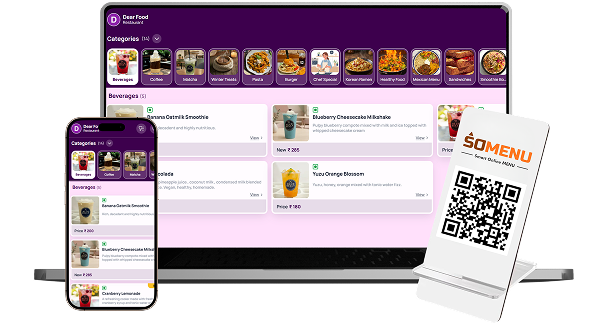

What You’ll Get From QR Menu & Theme

Custom QR
Menu & Theme

AI-Powered
Menu Creation
Customer Reviews
& Ordering
How QR Menu & Theme
Speeds Up Your Workflow
Step-by-step visual walkthrough showing how QR Menu & Theme operates in your restaurant.
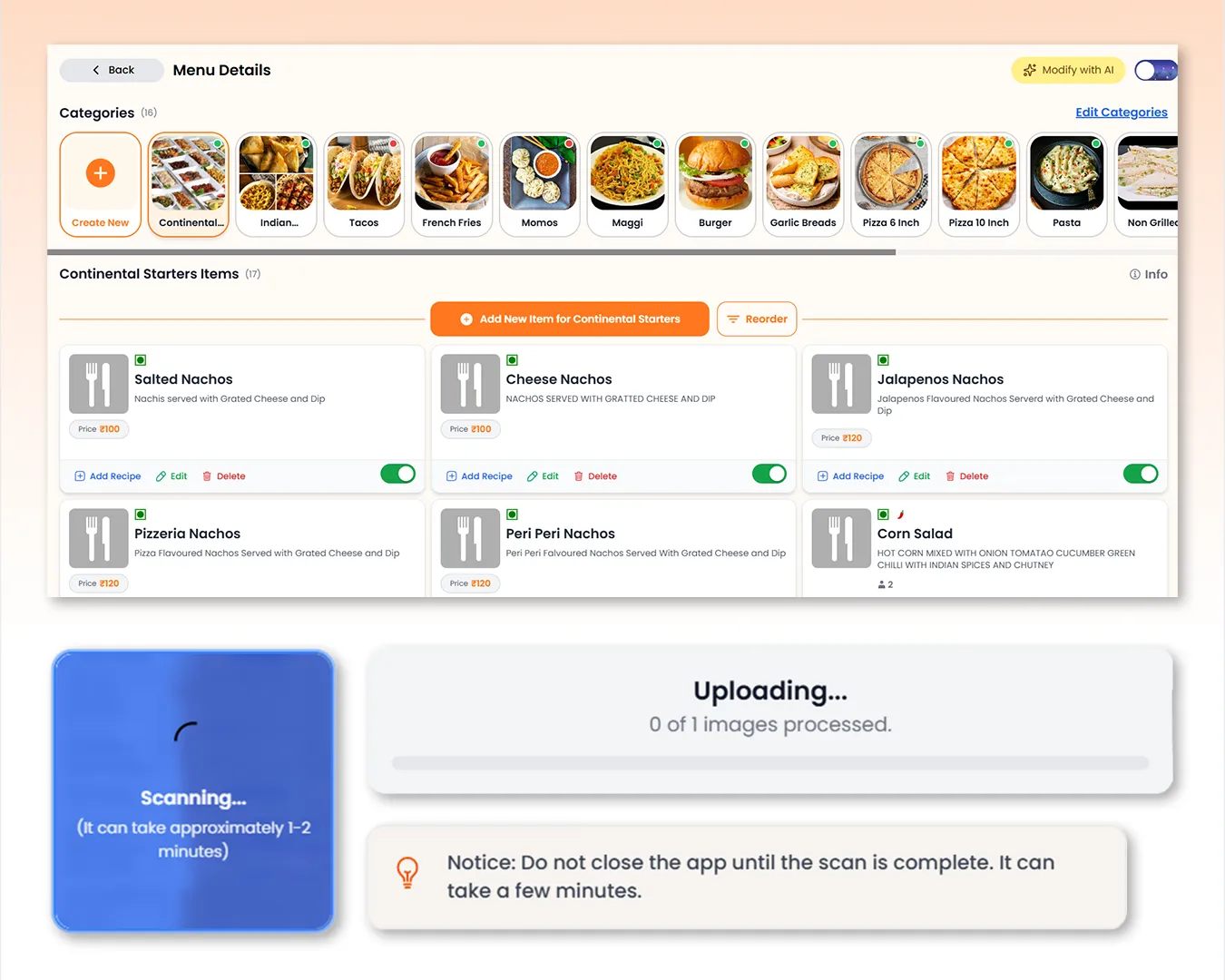
Build & Manage Your Digital Menu with AI
Create your digital menu by scanning printed menus with AI or build it manually from scratch. Get daily free AI scan credits, while full manual controls let you organize categories, add items, upload images, configure multiple price variants, descriptions, dietary labels, badges, spice levels, serving sizes, taxes, printer stations, and much more. Manage everything from a clean visual interface that makes updating your menu fast, organized, and effortless.
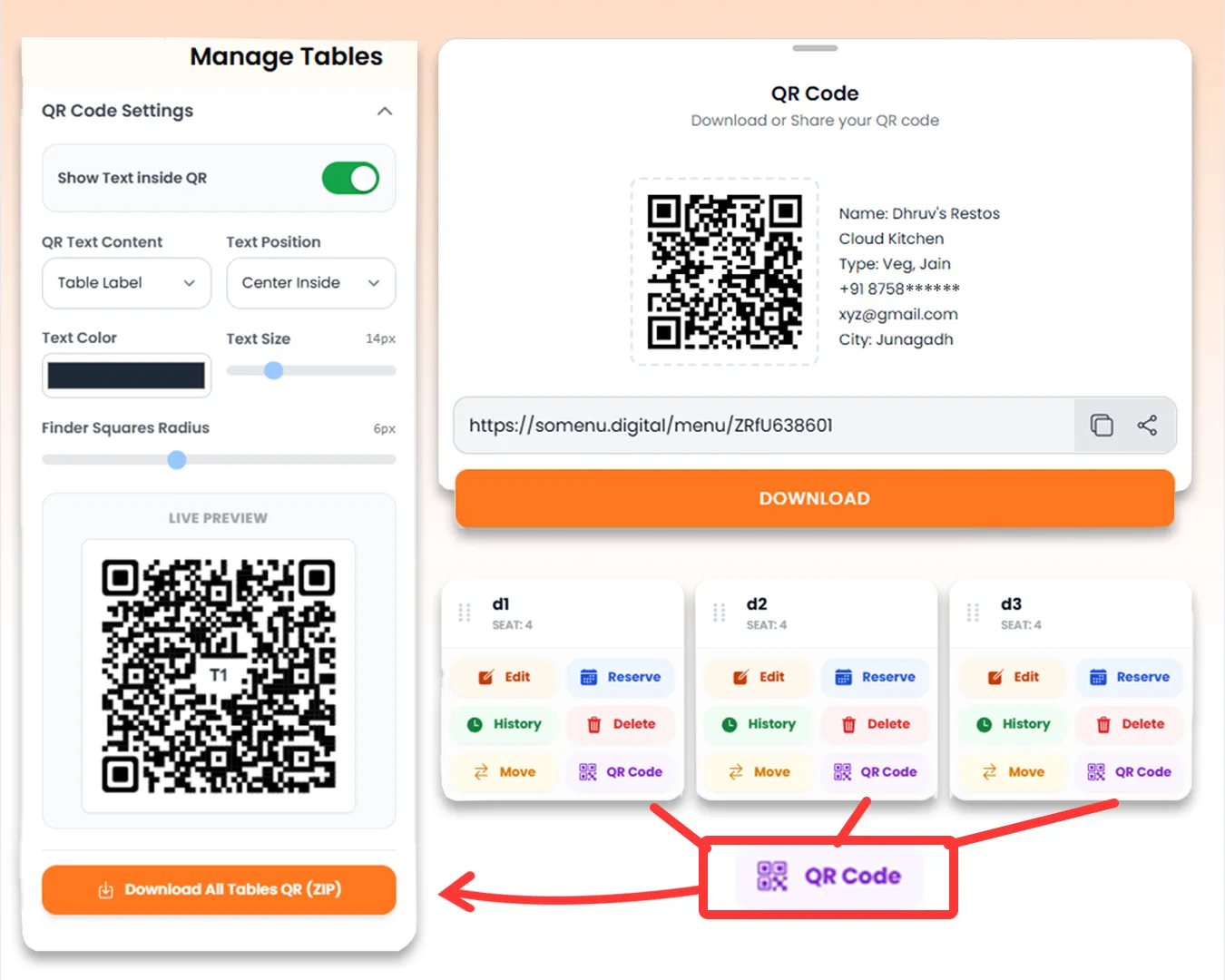
Smart QR Codes for Menus & Tables
Generate a shareable digital menu URL and QR code instantly for your restaurant. Create unique QR codes for every table, customize their appearance with your preferred text, colors, and layout, then download or share them individually or in bulk. Whether placed on tables, takeaway packaging, social media, or flyers, customers can scan and access your menu in seconds without installing an app.
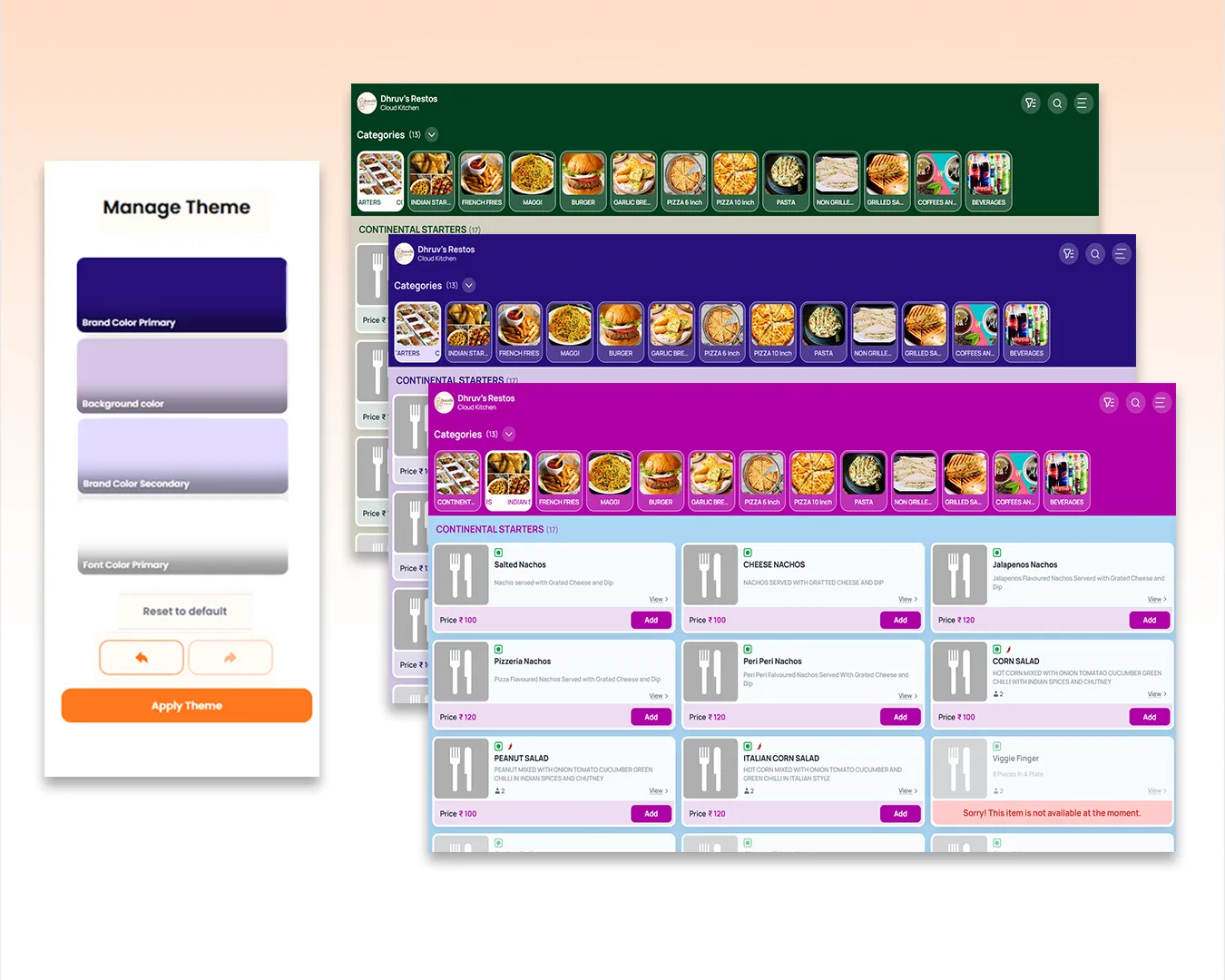
Customize Your Digital Menu Experience
Make your QR menu feel like an extension of your brand with customizable colors, backgrounds, typography, and splash screens. Preview every change in real time across mobile, tablet, and desktop views before publishing, ensuring customers enjoy a consistent and visually engaging digital menu experience on every device.
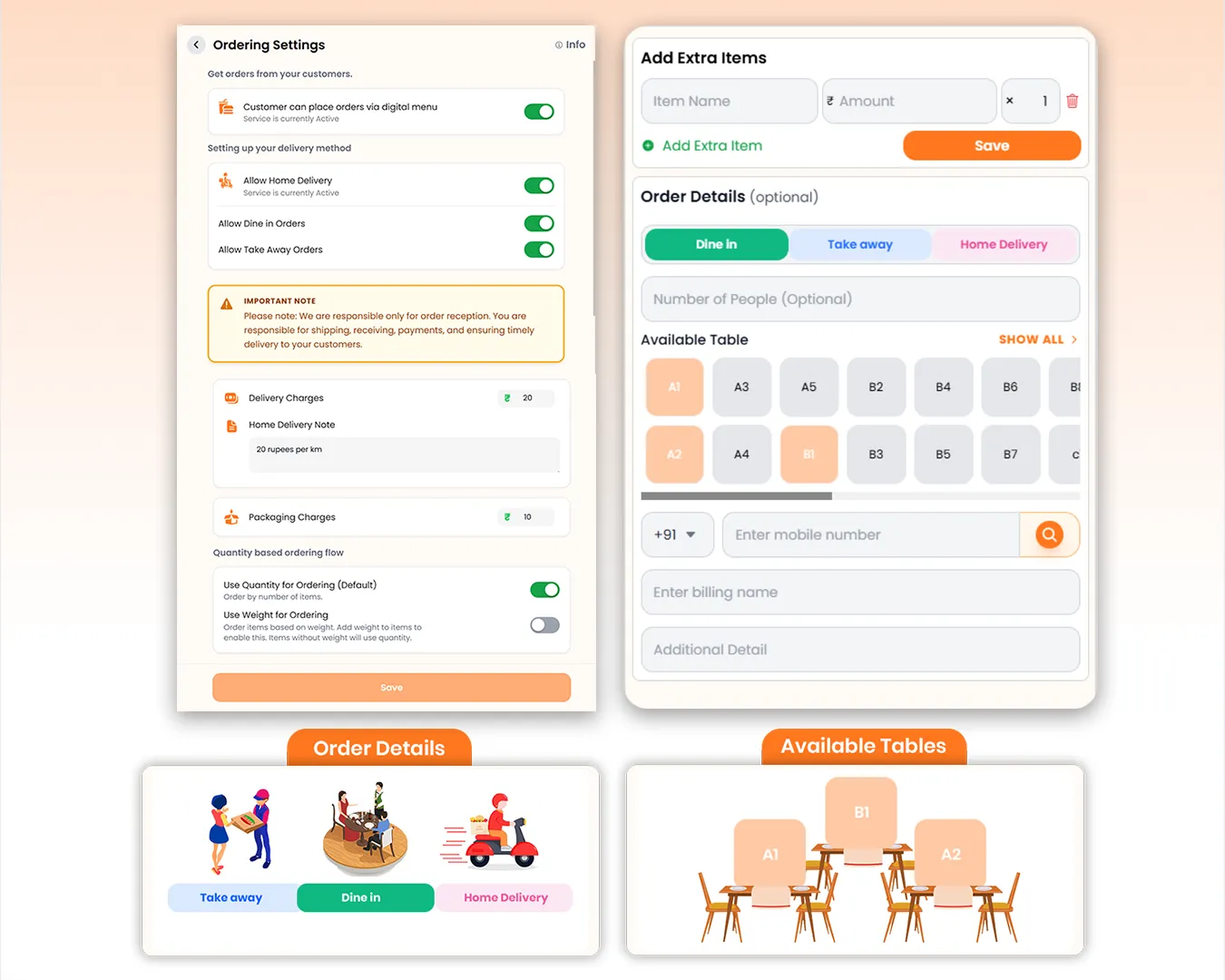
Flexible Customer Ordering Settings
Customize how customers place orders through your digital menu. Enable/Disable customer side orderings, Dine In, Take Away or Home Delivery orders, configure default delivery and packaging charges, add custom delivery instructions, and choose between quantity-based or weight-based ordering for businesses like sweet shops, bakeries, and grocery stores.
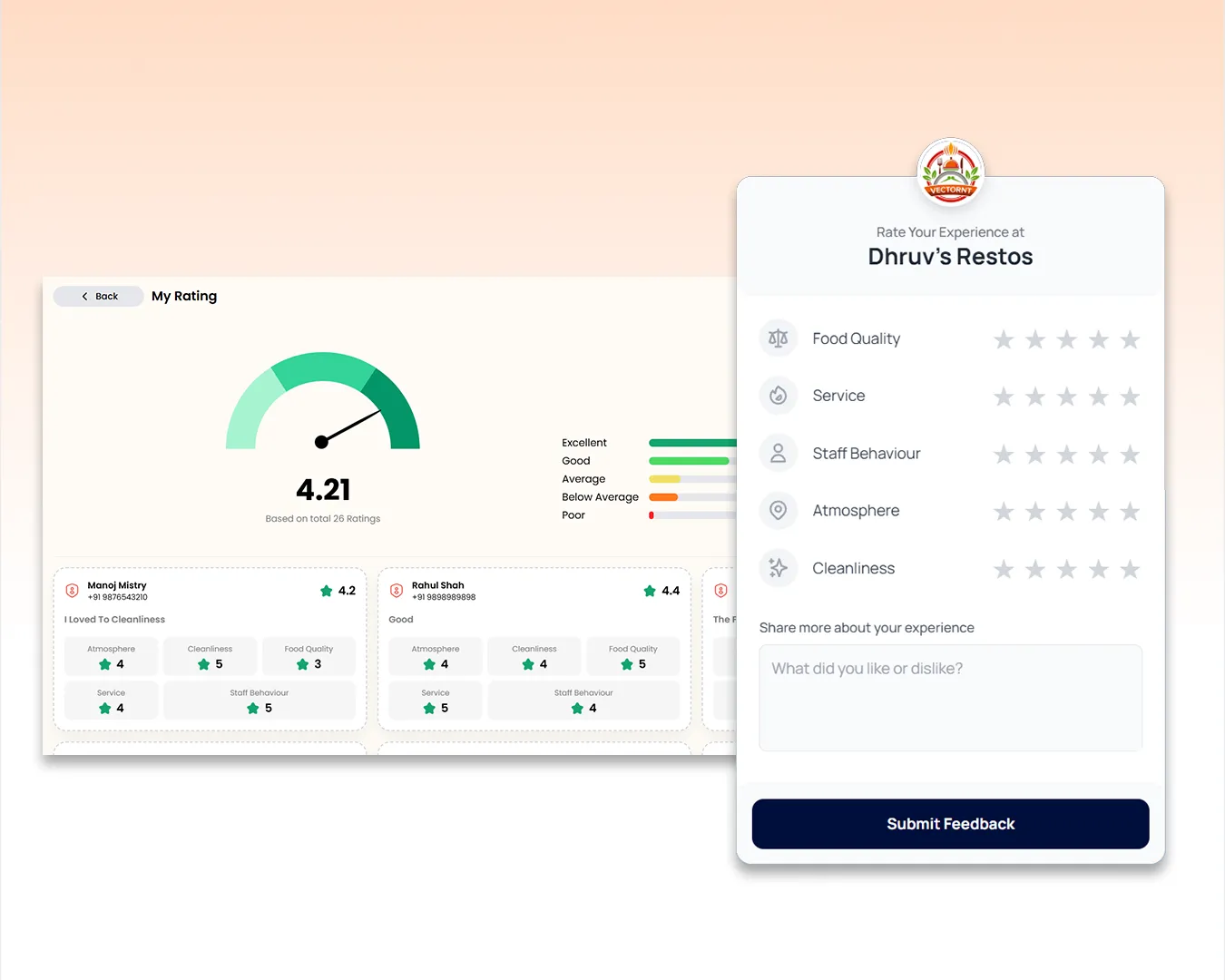
Restaurant Review & Customer Feedback System
Improve customer satisfaction with a built-in restaurant review system integrated into your QR menu. Guests can submit verified review, rating food quality, service, cleanliness, atmosphere, and staff behavior while leaving written feedback. Track overall ratings and detailed review analytics to understand guest experiences and continuously improve your restaurant.
Manage your QR Menu & Theme operations easily and digitally
Give your restaurant a modern digital dining experience with SOMENU's Digital QR Menu. Create your menu manually or let AI build it from menu images, then update items, prices, offers, and availability instantly without reprinting QR codes. Customers simply scan the QR Code and browse your latest menu from any device.
Customize your QR menu with your own branding, colors, and layouts, generate restaurant or table-specific QR codes, enable dine-in, takeaway, and delivery ordering, collect verified customer reviews, and manage everything from one powerful dashboard.
SOMENU Advantage
Specifically designed to tackle common food business hurdles in India-like internet disconnections, waiter training, and peak hour order rush.
- ✓ No expensive hardware needed
- ✓ Easy for staff to learn (10 mins)
- ✓ 15-day risk-free free trial
Why Choose SOMENU for
QR Menu & Theme
Powering your restaurant business with features that eliminate manual hassle and boost kitchen speed.
AI & Manual Menu Builder
Create menus with AI image scanning or build them manually with complete control.
Menu & Table QR Codes
Generate shareable menu links and custom QR codes for every table.
Fully Customizable Themes
Personalize colors, typography, splash screens, and layouts to match your brand.
Real-Time Menu Updates
Update prices, availability, offers, and menu items instantly without reprinting QR codes.
Customer Ordering Options
Enable dine-in, takeaway, delivery, quantity-based, or weight-based ordering.
Verified Reviews & Ratings
Collect one verified review per customer with detailed ratings and feedback.
All Included Features
Everything you need in one powerful POS system. No separate purchases required.
Operations


Customer Experience



Analytics & Global




Operations
Customer Experience
Analytics & Global
Operations
Customer Experience
Analytics & Global
Operations
Customer Experience
Analytics & Global
Operations
Customer Experience
Analytics & Global
Operations
Customer Experience
Analytics & Global
FAQs
Everything you need to know about the QR Menu & Theme.
Instantly. Edits made in your SOMENU dashboard are pushed live in real-time, eliminating the need to reprint physical menu cards.
Yes, you can upload high-resolution images, set food tags (like Veg/Non-Veg, Spicy), and add descriptions to entice customers.
Yes, SOMENU supports multiple menu configurations that you can schedule or toggle live with a single click.
Book Your Free SOMENU POS Demo
Get a personalized demo of the leading restaurant billing software. We will contact you as soon as possible to help configure your menu.
Call or WhatsApp
+91 80 9393 5050Email Support
contact@somenu.digitalCorporate Office
401, Alpha One Complex, Zanzerda Cross Road,
Junagadh - 362001, Gujarat, Bharat
Contact Us
Request a Callback
Still Thinking?
Try Our 15 Days Free Trial.
