

Restaurant Reports & Sales Analytics
Turn restaurant data into clear business insights.
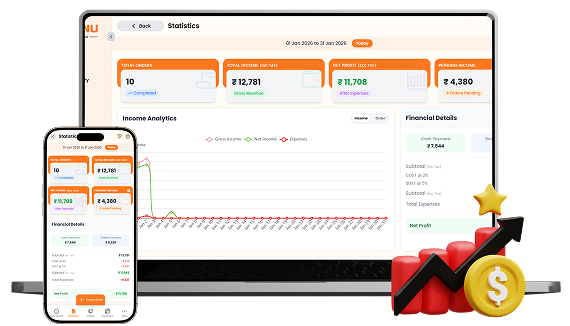
Get a complete view of your restaurant's financial and sales performance from one analytics dashboard. Track orders, sales, net profit, pending income, payment methods, expenses, top-selling items, and revenue trends across selected dates.

What You’ll Get From Reports & Statistics

Sales & Revenue
Analytics

Profit & Expense
Tracking
Top & Least Sold
Item Analysis
How Reports & Statistics
Speeds Up Your Workflow
Step-by-step visual walkthrough showing how Reports & Statistics operates in your restaurant.
Track Sales, Finances & Menu Performance
Get a complete view of your restaurant's performance with total orders, sales, net profit, pending income, payment totals, taxes, and expenses. Analyze sales and profit trends across selected dates, while comparing top-selling and least-selling menu items to understand revenue, financial performance, and customer demand.
Download Detailed Restaurant Reports
Choose your preferred report format and download your analytics data for further analysis or record keeping. Export reports as a styled Excel file for organized analysis or a simple CSV file when you need a lightweight, easy-to-process report.
Manage your Reports & Statistics operations easily and digitally
Get a complete overview of your restaurant performance with total orders, sales, net profit, and pending income for your selected reporting period.
Understand your financial performance with detailed payment totals, taxes, expenses, income, and net profit, helping you see where your restaurant's money is going.
Analyze your menu performance by comparing top-selling and least-selling items, making it easier to understand customer demand and identify items that need attention.
Download your analytics whenever you need them. Choose a styled Excel report for organized analysis or a simple CSV file for easy data processing and record keeping.
SOMENU Advantage
Specifically designed to tackle common food business hurdles in India-like internet disconnections, waiter training, and peak hour order rush.
- ✓ No expensive hardware needed
- ✓ Easy for staff to learn (10 mins)
- ✓ 15-day risk-free free trial
Why Choose SOMENU for
Reports & Statistics
Powering your restaurant business with features that eliminate manual hassle and boost kitchen speed.
Sales & Revenue Analytics
Track orders, sales, revenue trends, and restaurant performance across selected dates.
Profit & Expense Tracking
See expenses, taxes, net profit, and income details in one financial overview.
Payment Breakdown
Analyze your Cash, Online, and Wallet payment totals from a single report.
Top & Least Sold Items
Identify your best-selling and least-selling menu items by quantity.
Date-Based Reports
Analyze restaurant performance for the specific dates and reporting periods you need.
Excel & CSV Export
Download your analytics as a styled Excel report or a simple CSV file.
All Included Features
Everything you need in one powerful POS system. No separate purchases required.
Operations




Customer Experience




Analytics & Global



Operations
Customer Experience
Analytics & Global
Operations
Customer Experience
Analytics & Global
Operations
Customer Experience
Analytics & Global
Operations
Customer Experience
Analytics & Global
Operations
Customer Experience
Analytics & Global
FAQs
Everything you need to know about the Reports & Statistics.
You can track total orders, sales, net profit, pending income, payment totals, taxes, expenses, sales trends, and top or least-selling menu items from the analytics dashboard.
Yes. Financial Details shows income, taxes, total expenses, and net profit, helping you understand your restaurant's overall financial performance.
Yes. The Top Sold Items section lets you switch between Top Sold and Least Sold views to see which menu items are performing best or selling less during the selected period.
Yes. Select the reporting period from the Statistics dashboard to analyze your restaurant's sales and financial performance for the dates you need.
Yes. SOMENU lets you download your analytics as either a styled Excel report or a simple CSV report, depending on how you want to use the data.
The financial details section separates payment totals into Cash Payment, Online Payment, and Wallet, giving you a clear view of how customers paid.
Book Your Free SOMENU POS Demo
Get a personalized demo of the leading restaurant billing software. We will contact you as soon as possible to help configure your menu.
Call or WhatsApp
+91 80 9393 5050Email Support
contact@somenu.digitalCorporate Office
401, Alpha One Complex, Zanzerda Cross Road,
Junagadh - 362001, Gujarat, Bharat
Contact Us
Request a Callback
Still Thinking?
Try Our 15 Days Free Trial.
