

Restaurant Expense Tracking & Cost Management
Track every expense. Stay in control of your costs.
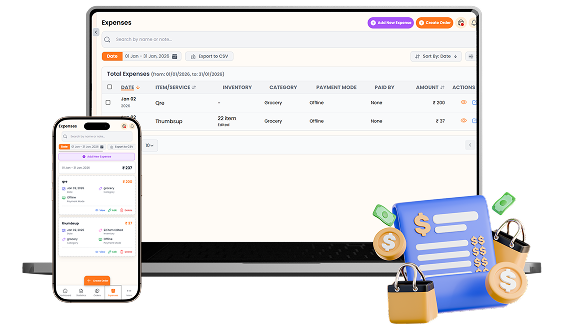
Keep every restaurant expense organized in one place. Record expenses with payment details, categories, dates, notes, and attachments, then search, filter, sort, export, and review your spending whenever you need.

What You’ll Get From Expense Tracking

Centralized Expense
Records

Payment & Category
Tracking

Search, Filter &
Export Expenses
How Expense Tracking
Speeds Up Your Workflow
Step-by-step visual walkthrough showing how Expense Tracking operates in your restaurant.
Record & Manage Restaurant Expenses
Add and organize restaurant expenses with the item or service name, amount, date, category, payment mode, and person who paid. Add vendor details, bill numbers, notes, and supporting files, while keeping inventory-related purchases connected to their expense records for a clearer view of restaurant spending.
Analyze & Export Restaurant Spending
Select a date range to see total expenses for a specific period and review detailed spending records in one place. Search by name or note, sort and filter expenses, and export your records to CSV for bookkeeping, analysis, reporting, or sharing with your accountant.
Manage your Expense Tracking operations easily and digitally
Record every restaurant expense in one place with the item or service name, amount, date, category, payment mode, and person who paid.
Keep expense records organized with notes and file attachments for details such as vendor names, bill numbers, receipts, or other supporting documents.
Review your spending with date-based totals and detailed expense records. Search by name or note, sort entries, and use filters to quickly find the information you need.
Keep inventory purchases connected with expenses so stock additions can be reflected in your spending records. Export your expense data to CSV whenever you need it for analysis or bookkeeping.
SOMENU Advantage
Specifically designed to tackle common food business hurdles in India-like internet disconnections, waiter training, and peak hour order rush.
- ✓ No expensive hardware needed
- ✓ Easy for staff to learn (10 mins)
- ✓ 15-day risk-free free trial
Why Choose SOMENU for
Expense Tracking
Powering your restaurant business with features that eliminate manual hassle and boost kitchen speed.
Expense Records
Record restaurant expenses with amounts, dates, categories, payment modes, and notes.
Payment Tracking
Track whether expenses were paid through Online or Cash and record who paid them.
Expense Categories
Organize spending by categories to keep different types of restaurant costs structured.
Inventory Expense Linking
Connect stock additions with expense records to track inventory-related spending.
Search & Filters
Quickly find expense records using search, date ranges, sorting, and filters.
CSV Export
Export expense records to CSV for bookkeeping, analysis, and record keeping.
All Included Features
Everything you need in one powerful POS system. No separate purchases required.
Operations




Customer Experience



Analytics & Global



Operations
Customer Experience
Analytics & Global
Operations
Customer Experience
Analytics & Global
Operations
Customer Experience
Analytics & Global
Operations
Customer Experience
Analytics & Global
Operations
Customer Experience
Analytics & Global
FAQs
Everything you need to know about the Expense Tracking.
You can record different restaurant expenses such as groceries, salaries, services, and other business costs by adding the expense name, amount, category, payment details, date, and notes.
Yes. Each expense can be recorded with its payment mode, including Cash or Online, along with the person who paid the expense.
Yes. Assign a category to each expense so different types of restaurant spending can be organized and reviewed more easily.
Yes. Inventory stock additions can be connected with expense records, allowing you to see inventory-related quantities and costs alongside your other restaurant expenses.
Yes. Search expenses by item or note and use date ranges, sorting, and filters to quickly find specific expense records.
Yes. You can export your expense records to CSV for bookkeeping, analysis, reporting, or sharing the data with your accountant.
Yes. Expense records can be viewed, edited, or deleted directly from the expense list whenever you need to correct or manage an entry.
Book Your Free SOMENU POS Demo
Get a personalized demo of the leading restaurant billing software. We will contact you as soon as possible to help configure your menu.
Call or WhatsApp
+91 80 9393 5050Email Support
contact@somenu.digitalCorporate Office
401, Alpha One Complex, Zanzerda Cross Road,
Junagadh - 362001, Gujarat, Bharat
Contact Us
Request a Callback
Still Thinking?
Try Our 15 Days Free Trial.
