

Restaurant Inventory Management & Stock Control
Track stock, control usage, and stay prepared.
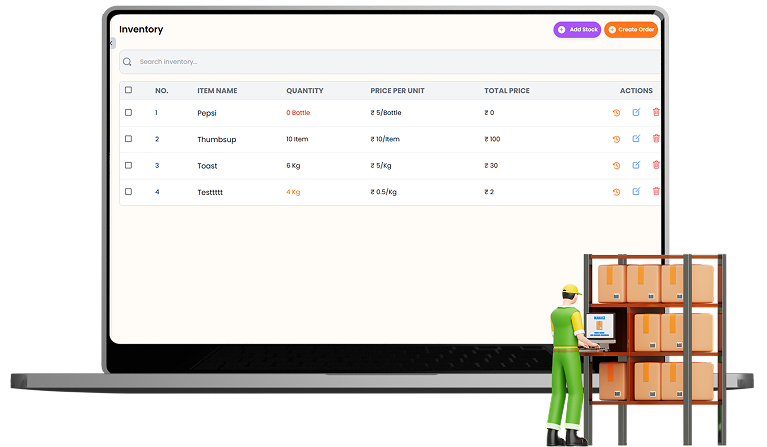
Keep raw materials and stock levels organized in one place. Track available quantities, add new stock, monitor usage and wastage, set low-stock alerts, and connect ingredients directly with menu recipes for more accurate inventory control.

What You’ll Get From Inventory Management
Real-Time Stock
Tracking
Smart Low-Stock
Alerts

Recipe-Based
Stock Control
How Inventory Management
Speeds Up Your Workflow
Step-by-step visual walkthrough showing how Inventory Management operates in your restaurant.

Manage Stock Levels & Add New Inventory
Manage all your inventory items from one place with current quantities, unit prices, total stock value, and low-stock indicators. Add new stock with quantity, unit, purchase price, category, date, notes, and supporting attachments while setting a custom alert level to know when an item needs replenishment.

Track Ingredient Usage & Adjust Stock
See where each inventory item is being used across your menu and track stock movement more clearly. Record used or dead stock, adjust quantities when actual inventory changes, and keep stock records aligned with what is physically available in your restaurant.

Create Recipes & Connect Ingredients
Link menu items with the exact ingredients they use by creating recipes directly from the menu. Define the required quantity and unit for each ingredient so inventory can reflect ingredient consumption more accurately as menu items are prepared and sold.
Manage your Inventory Management operations easily and digitally
Without tracking raw ingredients, food waste and stock leakage can severely damage your restaurant's margins. SOMENU's Inventory Management module links dish recipes directly to raw stock items. Whenever an item is billed at the cash counter, the required ingredient quantities are automatically deducted.
You can define low-stock alert limits to receive warnings before running out of essential items, manage kitchen wastage logs, and check cost-of-goods-sold (COGS) reports to maintain highly profitable margins.
SOMENU Advantage
Specifically designed to tackle common food business hurdles in India-like internet disconnections, waiter training, and peak hour order rush.
- ✓ No expensive hardware needed
- ✓ Easy for staff to learn (10 mins)
- ✓ 15-day risk-free free trial
Why Choose SOMENU for
Inventory Management
Powering your restaurant business with features that eliminate manual hassle and boost kitchen speed.
Stock Tracking
Track item quantities, unit prices, stock value, and current availability in one place.
Low-Stock Alerts
Set custom stock limits and get clear warnings when ingredients need replenishment.
Easy Stock Replenishment
Add new stock with quantity, pricing, payment details, dates, categories, and notes.
Usage & Waste Tracking
See where ingredients are used and record used or dead stock when quantities change.
Stock Adjustments
Adjust inventory quantities when actual stock differs from your recorded balance.
Recipe-Based Inventory
Connect menu items with ingredients and define the exact quantities used in each recipe.
All Included Features
Everything you need in one powerful POS system. No separate purchases required.


Customer Experience



Analytics & Global




Customer Experience
Analytics & Global
Customer Experience
Analytics & Global
Customer Experience
Analytics & Global
Customer Experience
Analytics & Global
Customer Experience
Analytics & Global
FAQs
Everything you need to know about the Inventory Management.
Yes. You can link raw ingredients to your menu items. Whenever a dish is sold, the system automatically deducts the required ingredient weights or units from your stock.
Yes, you can set custom alert thresholds for each ingredient. The dashboard will flag items that fall below your minimum levels.
Yes, SOMENU includes vendor tracking, stock-in entries, and purchase logs to keep your food costs under tight control.
A restaurant inventory management system is software that tracks your raw materials, ingredient stock levels, and consumption in real time. SOMENU's inventory management links dish recipes to raw ingredients — when a dish is sold, stock is automatically deducted, and you get low-stock alerts before you run out.
SOMENU's restaurant inventory management system tracks each ingredient's usage against sales. You can see wastage logs, find which items overstock, and set low-stock alerts — helping reduce over-purchasing and spoilage significantly.
Yes. SOMENU's inventory management calculates your cost-of-goods-sold (COGS) based on recipe ingredient costs vs sales, giving you a clear profitability picture for every menu item.
Book Your Free SOMENU POS Demo
Get a personalized demo of the leading restaurant billing software. We will contact you as soon as possible to help configure your menu.
Call or WhatsApp
+91 80 9393 5050Email Support
contact@somenu.digitalCorporate Office
401, Alpha One Complex, Zanzerda Cross Road,
Junagadh - 362001, Gujarat, Bharat
Contact Us
Request a Callback
Still Thinking?
Try Our 15 Days Free Trial.
